
Where the price of an internal system sits
An internal system is an application only your own people use: sales, production, dispatch, management. Customers do not sign in, so there is no registration, no customer area and usually no payments. That is why it tends to cost less than a client portal, for which the service page gives a lower bound from 122,000 CZK.
For internal tools we most often meet two scopes. A first version from 53,000 CZK: one role, one main workflow, deployment and handover. An operational tool from 80,000 CZK: records the team uses every day, with overviews and exports. Both figures are indicative lower bounds from the calculator, excluding VAT, not an offer.
What the price of an application is made of in general, why we do not quote straight away and what four model budgets look like is covered in How much does a custom application cost? This article goes one step further: what specifically makes an internal system more expensive and how to work out whether it is worth it.
What decides the price
The calculator works from hours and a rate of 1,500 CZK per hour excluding VAT. As you add requirements to an operational tool, the range grows like this. We assume your materials are ready and a standard timeline.
| Scope | Range | Delivery |
|---|---|---|
| First version: one role, one workflow | 53,000 to 77,000 CZK | 2 to 4 weeks |
| Operational tool for a team | 80,000 to 116,000 CZK | 2 to 4 weeks |
| + more roles with separate permissions | 113,000 to 164,000 CZK | 3 to 5 weeks |
| + connection to another system | 134,000 to 194,000 CZK | 4 to 6 weeks |
| + data migration from an old solution | 158,000 to 228,000 CZK | 4 to 8 weeks |
What those rows mean in day-to-day operations:
Job records
The core of almost every internal system. The price is not decided by how many fields a job has, but by how many states it passes through and what is allowed in each. A job that goes “received, done, invoiced” is different work from one that waits for material, goes back for rework and splits into parts.
Overviews for management
An overview is cheap when it reads data already in the system. It tends to get expensive when it is meant to show something nobody records today. Before you order one, try to say what decision you will make from it and which data it comes from.
Roles and permissions
More roles with separate permissions add 22 hours in the calculator, which is 33,000 CZK on the lower bound. Each role means its own view of the data, its own rules and situations that have to be tested. A good question to start with: does a sales person really need to see different things from their manager, or will one view do for everyone?
Approvals
Approving a quote, a discount or a purchase looks like one button. In reality it brings more states, another role and questions that used to be settled by phone: who approves when someone is away, what happens to a request that is sent back, who gets notified. If the business can manage without it for a while, we recommend leaving it for the next phase.
Integrations and data migration
A connection to invoicing, stock or a CRM adds 14 hours in the calculator (21,000 CZK), migrating data from an old solution 16 hours (24,000 CZK). Both are averages, though. The real scope depends on what interface the other system has and what state your spreadsheets are in. If you are only considering a connection, have a look at integrations and automation.
Start with a smaller first version
The most expensive internal system is the one built for a year from a wish list, after which people keep typing into the spreadsheet anyway. So we recommend starting with one part the team will actually use, and deciding what comes next based on how it works in practice.
- Pick the workflow that slows you down most. Not the most complex one, but the one that creates the most manual work or errors today.
- One role to begin with. Usually the people who enter the data. Management gets its overview in the next step, once there is something to calculate it from.
- Leave integrations for later if you can. An export to invoicing can run by hand for a while, and the connection is added once it is clear which data should flow.
- Approvals and exceptions once operations show the need. It often turns out that half the exceptions you wanted to handle never happen in practice.
In the calculator, a first version is one workflow, a few screens and no integrations, 53,000 to 77,000 CZK. It can be extended. We handle changes as we go, not as a new project from scratch.
A first version does not have to do everything. It has to handle what slows you down most today, and the rest can wait until day-to-day use confirms it.
Example: WCRM, an internal CRM
Our own internal tool shows where the hours come from. WCRM is a CRM for the Walio sales team and is in development. We kept leads in a spreadsheet, and after a few hundred records that stopped working: nobody could see who had called whom and what should happen next.
A record of companies and contacts alone would be a small job. The scope comes from three roles with their own set of screens (sales person, manager, admin), two interfaces for desktop and phone, and a connection to Scrapik, where batches of leads are meant to come from. Add business rules nobody sees: a new batch must not overwrite work in progress, a company removed by hand must not come back as new, and the duplicate check also matches on a person’s name.

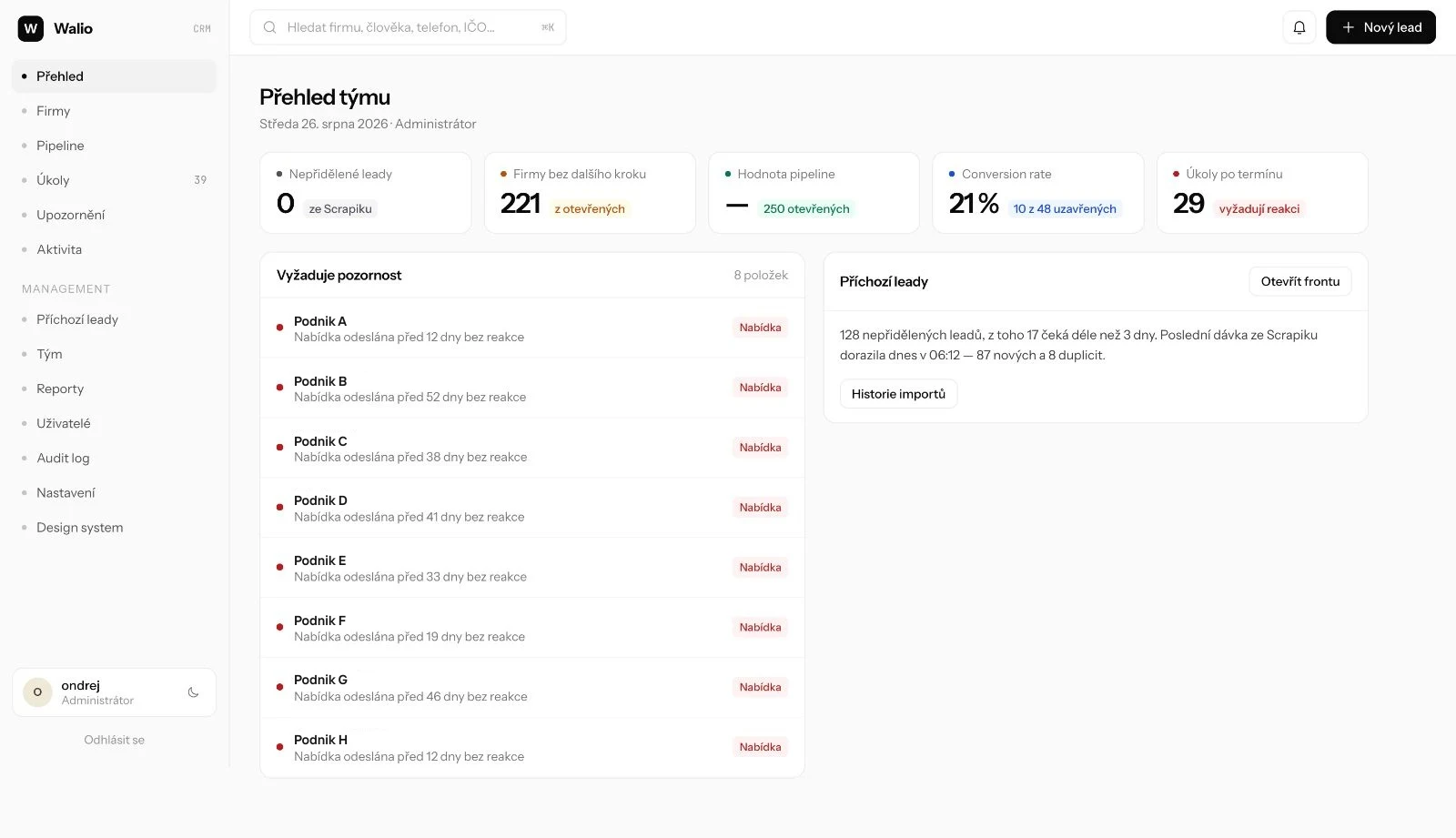
The process matches what we recommend to clients. First came the screen design and the data model, then the database with sign-in and permissions. We are connecting the screens step by step, starting with lists and the detail view. The import from Scrapik, the most complex connection, is still in progress.
What the price usually includes and what it does not
The calculator estimate includes interface design, deployment with basic security, a basic handover and short training where the solution includes content management. With internal systems we train the people who work in the application. The exact scope is confirmed in the offer.
Usually outside the development price:
- Hosting, the domain and paid third-party services. You pay them directly to their providers. Running costs alone tend to be in the hundreds to low thousands of crowns a month, depending on load and on which paid services the system calls.
- A standalone UX and UI design. The calculator does not include it; we set its scope by the number of roles, screens and states.
- Changes and development after launch. For the first days we watch how it runs and fix what comes up. Maintenance and further development are agreed before launch, with a defined scope.
- Per-user licences. We do not charge them at all, so one more person on the team does not mean one more monthly fee for the system.
Access, documentation and the scope of the source code handover are settled in the offer and the contract before work starts. So is whose accounts the system will run on.
How to work out payback
An internal system does not pay off by looking good, but by people no longer doing work software can do for them. You can work out the payback in an afternoon, without us:
- List what is done by hand today: retyping jobs, chasing status, putting together the overview for management, fixing errors after retyping.
- For each activity, estimate the hours per month. The most accurate way is to log it for a week rather than guess from memory.
- Multiply the hours by what an hour of that person’s work costs you, including payroll costs.
- Assume manual work will not disappear completely. A cautious estimate of the savings is more honest than an optimistic one.
- Subtract the running costs of the system from the monthly savings. Divide the development price by what is left. The result is the number of months it takes to pay for itself.
If you get more than a couple of years, start with a smaller first version, or ask whether a ready-made tool would do. It happens, and we will say so.
The calculation should also include what is harder to measure in hours: retyping errors, a job that slipped because nobody knew whose it was. If you are unsure, the calculator gives an indicative range. The rest we can go through in a 30-minute consultation; just tell us what you handle in spreadsheets today: Discuss a project.